 You asked for it and now you have it!
Here at FanBox, we enjoy hearing what our users have to say. One of your most frequent requests has been the ability to personalize the look of your Virtual Desktop and Profile. It's taken plenty of time and effort, but we've done it!
To get started personalizing your FanBox Profile, just click the "edit" link from your profile.
From the Edit Page, simply click the blue "Show Me My Choices" button. The "Change Your Background" window will appear and you'll be on your way to personalizing your profile.
Our team has hand-selected over 50 quality images and color schemes that you can select from. And since we believe in putting you in control of your FanBox profile, you can even upload your own photos and truly personalize your account!
Personalizing your FanBox Virtual Desktop is just as easy!
To view your Virtual Desktop, simply click the "Web Desktop" tab on your FanBox taskbar.
As you may have noticed, your Virtual Desktop now has a "Change Your Background" icon. Double-click the icon to get started personalizing your Virtual Desktop. The "Change Your Background" window will appear and you can update your Virtual Desktop background, just like you did to your profile!
Did You Know?
You can also personalize your Virtual Desktop by clicking "Change My Background" from the FanBox Start Menu or by right-clicking on your desktop and selecting "Set My Desktop Background"; just like on your home PC!

Have ideas to help us improve the site?
You can provide us your feedback by clicking the "Suggest!" icon anywhere on the site.

Like I said, we love hearing what you have to say, so feel free to let us know what you'd like to see next at FanBox!
Happy Holidays from the FanBox team!
--Steven


 What's happening FanBox Fans? Lots of things are going on here at the company. One such thing is our continued focus on serving you with fun and challenging web applications. Check out FanBox profiles and you'll see a ton of games, quizzes, social apps, videos and more. When you see something you like, simply point and click, and "BAM", it's yours to enjoy on your very own FanBox profile. And believe me, there's something for everyone. Case in point, take FanBox's very own Jenna. She's a big fan of games, she's uber competitive and has a love for primates. She happens to see "Monkey Kick Ball" on Erick’s profile and in an instant she's kicking that ball to her heart's content. Best of all, Jenna can share her scores with her friends and expose their "monkey kick ball" skills.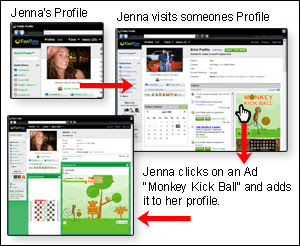


 Hello fellow FanBoxers!
 Here at FanBox, all the employees are divided into four teams; the Orange team, the Yellow team, the Green team, and the Blue team. Every few months we hold the
 Do you love playing games? Do you often spend hours on end at your computer battling goblins or kicking monkeys? Whether or not you’re a gamer, you’ll love FanBox’s newest gaming application. It is called Ultimate Arcades Mini Arcade, and I highly recommend trying it out.
 Here at FanBox, Fridays are especially enjoyable because we like to do some fun things to finish the week on a positive note. My friend and coworker, Brian, sometimes says “TBIF” instead of TGIF, for “Too Bad It’s Friday”…. Because at FanBox, the work is actually fun! So Fridays always mean good times and a day full of action!!


 My name is Jenna and I am here to say welcome to the magical land of FanBox! For many of us here at FanBox, this place is like our home away from home… We have a very close-nit community here and we always jump at the opportunity to grow and strengthen that kinship. What better way to do that than by extending our own stories and relationships into the FanBox world?!


 You may have noticed something new on your profile. It’s called “About Me” and it is all about you – what you like, what inspires you and what you’re looking for. Take 5 minutes to fill it out. Let us know what music you listen too, why you use FanBox, where you’re from, and just about anything else that makes you special. You’ll be amazed at how a little bit of information will make the quality of your experience here on FanBox increase. And, while you check out other profiles, take a look at their “About Me” section too. Tell your fans to fill out their “About Me” sections.
 Hi there! Hope February is off to a great start for you.
 Whether you’ve just become a FanBox member, or have been one for years, here is a little tip or refresher course on where your account setting are located.

 The FanBox Desktop is an interactive and inventive product that offers a wide array of features. With so many actions to choose from, it is easy to get absorbed in only one aspect of the website, without ever realizing what other products are at your fingertips.


